
Ascerta API Keys
API Key Assignment
Ascerta assigns API keys at the Application and Organization levels. These API keys are used for two primary purposes:
- AI spend and usage tracking
- Programmatic interaction with the Ascerta APIs
Organization API keys are only used to manage organization settings, and cannot be used for AI spend and usage tracking.
This application-level API key assignment ensures:
- Accurate attribution of AI provider usage to specific applications
- Separation of concerns with distinct security boundaries between services
- Independent management of each application's settings and configurations
Note that API keys are not needed for viewing dashboards, analytics, or other consumption activities within the Ascerta platform.
Access Application Settings
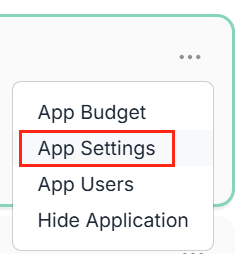
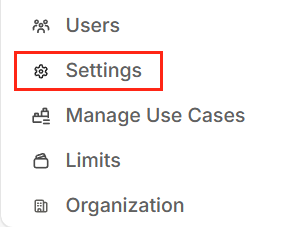
After creating an application in the Ascerta dashboard, go to the application settings. This can be accessed from the Organization view or from the Application dashboard.
From Organization View
From the organization view, click the ellipsis ('...') next to an application and click on Edit.
From Application Dashboard
From the application dashboard, click on Settings, located in the bottom left corner of the screen.
About API Keys
There are always two API keys for each application, and they can be regenerated independently. Functionally, there is no difference between the two keys.
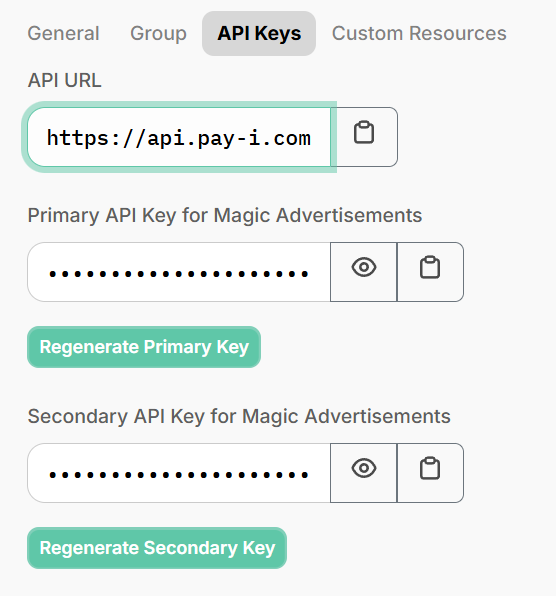
Having two keys enables secure secrets rotation without service interruption. You can update one key at a time in your systems while the other remains valid.
To see how these keys are used in your code, see Getting Started with Ascerta.
Updated 12 days ago